
Coding for Kids: Complete Parent Guide to Getting Started
Coding for Kids: Parent Guide to Getting Started
Parents hear the phrase coding for kids almost everywhere now. School newsletters mention it. Camps advertise it. App stores are full of it. Very few sources explain what a child actually does in a lesson. This guide from Kids Coding Online fixes that. You will learn when to start, which tools suit each age, and how real progress looks.
Why Coding for Kids Matters Beyond Career Prep
Most parents assume programming for kids is job training. That view is too narrow. Very few nine-year-olds become software engineers, and that is fine. The real value sits in how coding reshapes thinking.
A child writing a program must do four things at once:
- Break a large goal into small, ordered steps
- Predict what the computer will do before running the code
- Find the exact point where the logic failed
- Test a fix and confirm it worked
That loop is structured problem solving. It transfers directly to math, science, and writing. Coding for children also shifts screen time from passive to active. Instead of watching a game, your child builds one.
Right Age to Start Programming for Kids
There is no single correct starting age. There is, however, a reliable readiness signal. A child is ready for kids coding classes when they can read short instructions and follow a two-step sequence alone.
In practice, most children start between ages seven and nine. Older beginners are never behind. They simply move through the early stages faster.
Age matters less than the format. A seven-year-old in a live class with four students will outpace a twelve-year-old left alone with an app.
Best Coding Language for Kids by Age
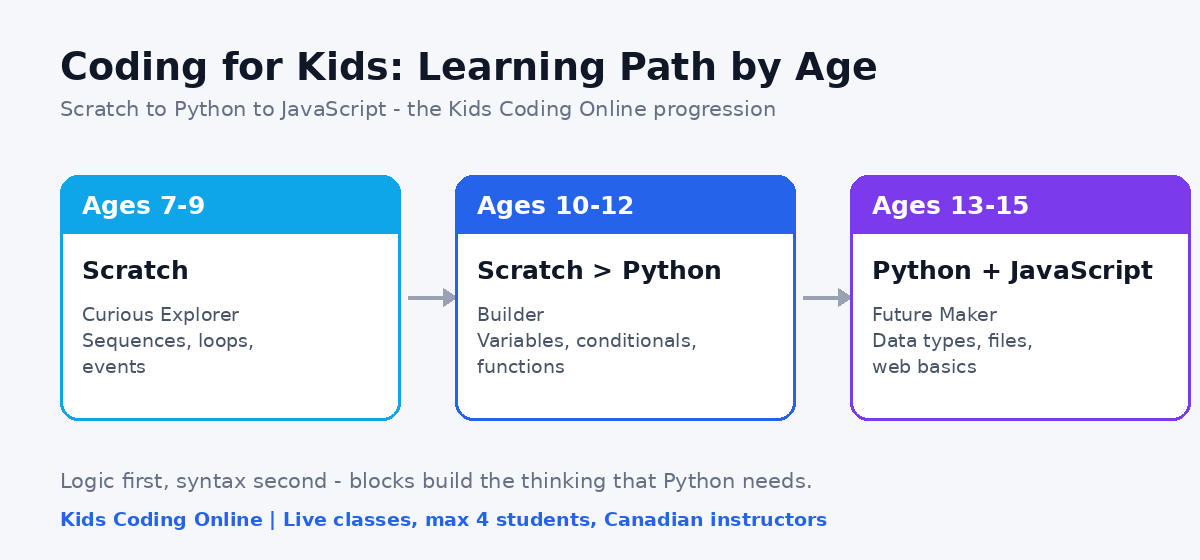
Choosing the right first tool prevents early frustration. The table below maps age to tool, focus, and a realistic first project. It mirrors the path we use at Kids Coding Online.
| Age group | Tool | Main focus | First real project |
|---|---|---|---|
| 7–9 — Curious Explorer | Scratch (blocks) | Sequences, loops, events | Animated story or simple maze game |
| 10–12 — Builder | Scratch to Python | Variables, conditionals, functions | Scoring game, then a Python quiz app |
| 13–15 — Future Maker | Python and JavaScript | Data types, files, web basics | Working web page or small app |
Two rules explain this table. First, blocks before syntax. Scratch coding for kids removes typing errors, so a child concentrates on logic. Second, Python for kids should come only after that logic is solid. A child who understands loops in Scratch learns Python syntax in weeks, not months.
Skills Children Build in Kids Coding Classes
Parents often ask what a report card for coding would show. These are the outcomes our instructors track:
- Decomposition — splitting a big idea into manageable parts
- Debugging — treating errors as information, not failure
- Abstraction — reusing one solution across different problems
- Persistence — staying with a bug for ten minutes instead of one
- Communication — explaining a project out loud to another person
The fourth item surprises people most. Coding gives children steady, low-stakes practice at being wrong and recovering. That habit is hard to teach any other way.
How Online Coding Classes for Kids Work at Kids Coding Online
Self-paced apps stall for a predictable reason. When a child gets stuck, nothing intervenes. A live teacher does.
Our program is built around that difference:
- Small groups, max 4 students. Every child gets real talk time and real feedback in each lesson.
- Real developer instructors. Lessons are taught by working Canadian developers, not gig tutors reading a script.
- Camera-on live classes. Sixty-minute sessions where every student is seen and heard.
- A clear path. Scratch to Python to JavaScript, with no gaps between levels.
- Canadian time zones. Scheduling fits around school and dinner, from PT to NT.
- 24/7 project access. Your child can open and show their work anytime.
One-to-one lessons are available when a child needs a fully custom pace. See pricing for details. Plans are month to month, and you can cancel anytime.
How to Choose Coding Classes for Beginners
Use this checklist when you compare providers of online coding classes for kids:
- Is instruction live, or is it prerecorded video?
- How many students share one teacher?
- Does the curriculum show a clear path from blocks to text languages?
- Can your child keep and share their finished projects?
- Is there a free lesson before you commit?
- Are the teachers actual developers?
If a provider cannot answer the first three questions clearly, keep looking.
Three Myths About Learning to Code for Kids
“My child must be strong at math.” Early programming needs sequencing and patience far more than arithmetic. Many students improve at math because they code, not the reverse.
“Coding is only for kids who like computers.” Some of the best beginners arrive through art, storytelling, or music. Scratch supports all three.
“Free apps are enough.” Free tools are excellent for exploration. They rarely produce structured progress, because nobody reviews the child’s work.
First Steps You Can Take This Week
Free tools let your child learn to code this week. Test their interest before you enroll anywhere:
- Open Scratch and let them change an existing project for twenty minutes.
- Ask them to explain what one block does. Listening beats instructing here.
- Watch the reaction to a bug. Curiosity is a strong signal.
- Book a free diagnostic lesson and compare it against solo screen time.
Frequently Asked Questions
Does my child need experience to start?
No. The free diagnostic lesson places your child at the right level, beginner or not.
How long until my child builds a real game?
Most students finish a playable project within the first few weeks of live classes.
Do we need a powerful computer?
No. Any laptop with a browser, webcam, and stable internet works.
Start With One Free Lesson
Coding for kids works best when a child sees results early and can ask someone when the code breaks. That is exactly what Kids Coding Online is built around: live Canadian instructors, groups of four, and projects your child will want to show you.